

Understanding Why Your Scopus Author ID Matters
Every researcher publishing in peer-reviewed journals needs a unique identifier in Scopus—the world’s largest citation database. Your scopus author id search isn’t just academic housekeeping. It’s your research identity, publication record, and professional credential. When institutions evaluate researchers or funding agencies assess credentials, they check your Scopus profile. Understanding Scopus Author Search and finding your Author ID is your first step toward managing research visibility.
Starting Your Scopus Author Search
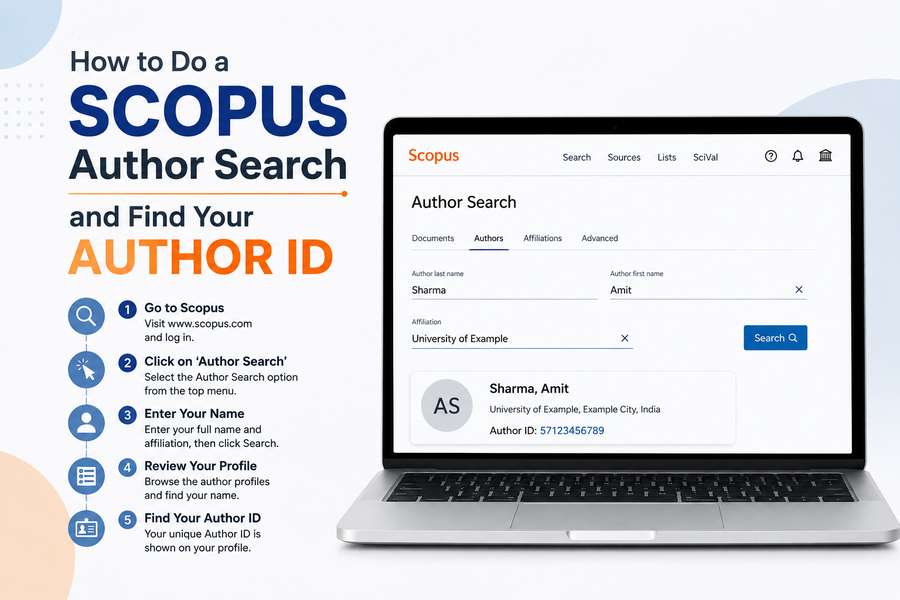
Scopus Author Search begins at scopus.com. Once you’re on the homepage, look for the “Search” option in the main navigation. You’ll see several search types available—what you want is “Author Search,” which is specifically designed for finding researcher profiles rather than searching publications.
Click on “Author Search” and you’ll arrive at a dedicated page for scopus search for author profile. This interface looks different from general publication search because it’s designed specifically for locating people rather than papers. The search fields available include author name, affiliation (your institution), research area, and optional document type filters.
Entering Your Information for Scopus Author ID Search
The accuracy of results from searching for a Scopus Author ID can be very important. Enter your full name (first name followed by last name) into the author name field. Since many authors may have published works using alternate versions of their name, such as after marriage and subsequent surname changes, or an abbreviated version of their first name, they may have to conduct a search for all of these. It has been observed that Scopus at times will create two separate profiles for one individual based on how their name appears within the database. Therefore, this is an important step.
Understanding Scopus Author Search Results
After executing a search through scopus author search results are shown as an index or list.
Each item in the results has information including the researcher’s name, their affiliated institution, research topics, the number of publications that they have published in scopus-indexed journals, and citation metrics for all of their publications.
Your actual profile will be listed along with all other researchers in this list.
Click on your correct profile in the scopus author search results when you locate it to display your full author profile.
This page includes all data related to your research visibility in scopus such as the indexed publications that are associated with your account, citation metrics, collaboration network data, etc.
The unique identifier of your scopus author id can also be found here; it is usually located at the top of each authors’ profile page, identified by a 9-digit number.
Claiming Your Profile for Scopus Index Author Search
Simply finding your profile through scopus index author search isn’t enough. You should claim it. Look for a “Claim profile” button on your author page. Claiming involves verifying your identity through email confirmation, but it’s worth the effort.
Maximizing Your Scopus Search for Author Profile
Scopus search for author profile becomes more valuable when your profile is complete. After claiming it, add a professional photo, write a brief biography explaining your research focus, list your subject area expertise, and include relevant research keywords. This information helps other researchers discovering you through Scopus Author Search immediately understand your work and research interests.
Finding Your Author ID for Future Use
Once you’ve located your Author ID through scopus author id search, save it. Write it down or bookmark your profile page. Your Author ID remains constant throughout your career, making it the reliable identifier for all your research. When publishing new papers, provide your Author ID to publishers. This ensures new publications automatically link to your established profile rather than creating duplicate records.
Conclusion
The entire process of finding your author id with Scopus through an author search takes about a couple of minutes; however, the time you take will benefit you throughout your career as a researcher. The process of searching for and claiming your scopus author id is very easy and follows these steps: go to www.scopus.com, then click on “Author Search”, then type your name into the search field, find your account in the search results, and then add yourself to that account. Upon completing all the steps, you’ll have a fully completed profile with Scopus (a citation database) showing off what you’ve done academically.
Time spent researching, adding and verifying your scopus profile can be considered a professional responsibility rather than vanity. A scopus profile provides other academics with access to how many publications you’ve published and where they were published. This makes doing a thorough search for your scopus author id much more significant for maintaining research visibility and future research opportunities.
Submit guest articles that reach decision-makers, influencers, and professionals. Yarabook offers a trusted platform for quality content, strong backlinks, and SEO-driven visibility. Pay. Publish. Promote.