

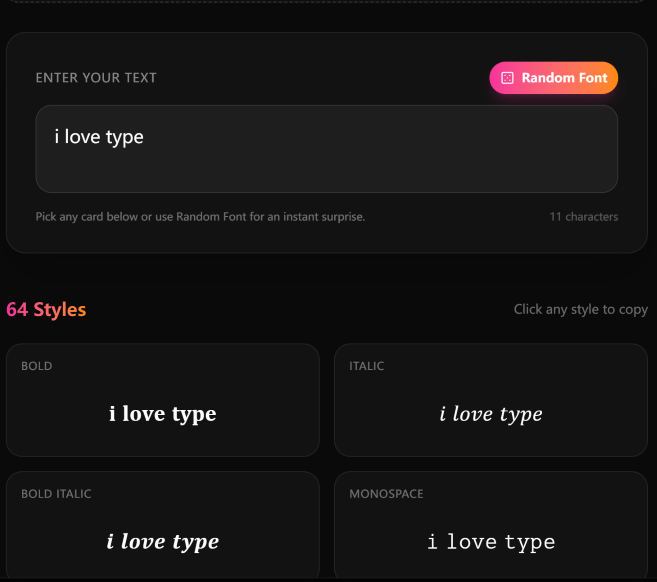
Have you ever seen those cool tiny fonts on Discord nicknames, Instagram bios, or TikTok videos and wondered how to make them yourself? You’re not alone. Thousands of users search for “small text generator” every month because they want to stand out from the crowd. The good news is: you don’t need any special software or design skills. With a free online tool called Small Text Generator, you can instantly convert any normal text into dozens of stylish small fonts. It works on almost every social platform – Discord, Instagram, TikTok, Twitter, WhatsApp, Telegram, and even Canva.
In this comprehensive guide, we’ll explain what a small text generator is, why you should use it, how to use it step by step, the best font styles for each platform, answers to common questions, creative ideas, and a comparison with other tools. By the end, you’ll be able to create unique, eye-catching text for all your social media profiles.
A small text generator is an online tool that converts regular letters and numbers into Unicode special characters. Unicode is the international standard that gives us emojis, special symbols, and alternative alphabets. Some of these characters look like smaller versions of normal text – for example, small caps (ᴇxᴀᴍᴘʟᴇ), superscript (ᵉˣᵃᵐᵖˡᵉ), or subscript (ₑₓₐₘₚₗₑ). Others change the style entirely, such as bold script (𝓔𝔁𝓪𝓶𝓹𝓵𝓮), Fraktur (𝔈𝔵𝔞𝔪𝔭𝔩𝔢), or circled (Ⓔⓧⓐⓜⓟⓛⓔ). Because these are real Unicode characters, you can copy and paste them into almost any app or website that supports text input. Unlike changing a font in Word or Photoshop, Unicode text works everywhere – as long as the platform supports Unicode (which 99% of modern apps do).
In 2026, social media is more crowded than ever. Standing out with plain text is nearly impossible. Here’s why small text can give you an edge:
Follow these simple steps to create your own small text using a free online tool:
That’s it. The entire process takes less than 10 seconds. You can generate as many different styles as you want, completely free.
Different platforms work best with different styles. Here are our top recommendations based on readability and visual impact:
Will it work on Discord?
Yes – Discord fully supports Unicode special characters. You can use small text for nicknames, channel names, custom statuses, and even message content. Many users have been doing this for years without any issues.
Will my friends see boxes instead of letters?
Most modern devices (Windows 10/11, macOS, iOS, Android) display these fonts correctly. Very old devices – for example, Windows 7 or Android 4 – might show some characters as boxes. However, that’s becoming increasingly rare. If someone sees a box, they can simply update their operating system or use a different browser.
Can I use it on Instagram? Will I get banned?
Absolutely. Instagram allows Unicode characters in bios, captions, highlights, and comments. Using a small text generator is no different from using emojis. It does not violate any terms of service, and you will not get banned. Millions of users do this every day.
How many characters can I use?
Each platform has its own character limit. For example, Discord nicknames max out at 32 characters. Instagram bios allow up to 150 characters. Some Unicode characters count as multiple bytes, so very long text might be truncated. Stick to short phrases for best results – a name, a tagline, or a single word.
Is the tool really free?
Yes – the Small Text Generator is completely free, with no hidden fees, no premium tiers, and no registration required. You can use it as much as you want, whenever you want.
Does it work on mobile?
Yes – the website is fully responsive. You can use it on your phone or tablet just like on a computer. The interface adapts to small screens, and the copy function works perfectly on iOS and Android.
Is my text safe?
All conversion happens inside your browser using JavaScript. Your text is never sent to any server. That means it’s private, secure, and also works offline (once the page is loaded).
Beyond social media profiles, here are some clever ideas to get even more value:
There are many font generators online, but most have annoying ads, require registration, or offer very limited styles. Here’s why Small Text Generator stands out:
Making your social media presence unique doesn’t have to be hard or expensive. With a simple, free tool like Small Text Generator, you can transform ordinary text into eye‑catching small fonts in seconds. Whether you’re a gamer wanting a cool Discord nickname, an influencer looking to refresh your Instagram bio, or just someone who enjoys creative expression – this tool is for you.
Don’t settle for plain text when you can stand out with small caps, superscript, mirrored, or bubble fonts. Try it now – it’s free, fast, and fun.
👉 Start generating your small text here: www.small-text-generator.online
If you found this guide helpful, share it with your friends. And if you have any questions, feel free to leave a comment below.
Submit guest articles that reach decision-makers, influencers, and professionals. Yarabook offers a trusted platform for quality content, strong backlinks, and SEO-driven visibility. Pay. Publish. Promote.